AI player tracking is software that uses computer vision to follow a specific athlete through existing game footage. You upload a video, tell the system which player to track, and the AI follows that player as the camera pans and other players move around them. The output is a set of clips focused on that one athlete — ready for recruiting reels, coaching review, or sharing with family.
This guide covers what AI player tracking actually is, how it works under the hood, how the major platforms compare, and how to pick the right one for your situation. We built PlayerTrac, so we have a perspective — but we'll be straightforward about where other platforms are stronger and where ours fits best.
What Is AI Player Tracking
At its core, AI player tracking does one thing: it watches video and follows a single athlete through the footage. Think of it as a tireless film assistant who never loses sight of your player, even when the camera zooms out, other players cross in front, or the action moves to the far side of the field.
The "AI" part is computer vision — a branch of machine learning trained to detect, identify, and follow human figures in video. The system learns what your player looks like (jersey number, body shape, position on the field) and maintains a lock on them frame by frame. When it temporarily loses the player — behind a cluster of defenders, off-screen during a camera pan — it re-identifies them when they reappear.
The practical output is a set of time-stamped clips where your athlete is the focus. These clips are the raw material. From there, you select the best moments, arrange them, and build a finished reel. The AI generates the raw clips; the user handles curation. This distinction matters because no AI system today can reliably judge which plays are "the best" for your specific purpose. A recruiting reel for a midfielder looks completely different from a coaching review of a goalkeeper.
The Problem It Solves
Before AI tracking, building a highlight reel meant one of three things:
- Manual scrubbing: A parent, coach, or the athlete themselves sits down with a full game video and scrubs through it, noting timestamps every time the player touches the ball, makes a play, or does something worth clipping. For a 90-minute soccer match, this easily takes 2–4 hours of painstaking work.
- Hiring an editor: You pay someone $100–$500+ per game to do the scrubbing for you, then edit the clips together with music and transitions. Professional results, but the cost adds up fast across a season.
- Not doing it at all: The most common outcome. The majority of high school athletes never build a proper highlight reel because the time and cost barriers are too high.
AI tracking collapses that first step — the tedious, time-consuming identification of "where is my player in this footage" — from hours to minutes. The footage goes in, the clips come out, and you spend your time on the creative part: choosing what to include and how to arrange it.
What It Doesn't Do
It's worth being clear about the boundaries. AI player tracking follows your athlete visually. It does not automatically know which plays are "good" and which aren't. It doesn't generate a finished, polished recruiting video with zero input from you. It doesn't replace coaching analysis or tactical film review. It's a tool that eliminates the most tedious step in the highlight reel process and gives you organized, player-focused clips to work with.
How It Works
The workflow is straightforward, but the technology underneath is genuinely sophisticated. Here's what happens when you run AI player tracking on a game video.
Step 1: Upload Your Video
You start with game footage. Depending on the platform, this might come from a phone, a GoPro mounted on a tripod, a dedicated sports camera like Trace or Veo, or even broadcast footage. The video gets uploaded to the platform's servers where the processing happens. Cloud-based processing means you don't need a powerful computer — the heavy computation happens on the platform's infrastructure.
Step 2: Identify Your Player
You tell the system which athlete to track. This might mean clicking on the player in a frame, entering a jersey number, or selecting from a detected roster. The system uses this initial identification as its reference point — this is the person it needs to follow.
Step 3: AI Tracks Through the Footage
This is where the computer vision does its work. The AI applies several techniques in combination:
- Object detection: The system identifies all human figures in every frame of the video. Modern detection models can do this even in crowded scenes with overlapping players.
- Player identification: Using the reference you provided, the AI determines which detected figure is your athlete. It uses multiple signals — jersey number recognition (when visible), body appearance, relative position, movement patterns — to maintain identification even as conditions change.
- Tracking through occlusions: When players collide, stack up in a corner, or move behind a referee, the tracked player temporarily disappears from view. The AI predicts where the player should reappear based on trajectory and speed, then re-identifies them when they become visible again. This is one of the hardest problems in sports tracking, and accuracy varies significantly between platforms.
- Re-identification after camera cuts: If the camera operator pans away and comes back, or if there's a break in footage, the system needs to find the player again from scratch. Re-identification models compare the player's visual features against the original reference to re-establish the track.
For a deeper technical look at these processes, see our article on how AI player tracking works.
Step 4: Get Your Clips
The system outputs a collection of clips — segments of the video where your player is present and active. These clips are time-stamped and organized, giving you the building blocks for a highlight reel without the hours of manual scrubbing.
The User's Job: Curation
After the AI delivers clips, the human part begins. You review the clips, select the strongest moments, arrange them in an order that tells a story, and export or share the final product. The AI's job is tracking and clipping. Your job is deciding what matters and presenting it well. This is intentional — a parent building a reel for grandparents will make different choices than a junior building a recruiting reel for college coaches, even from the same set of AI-generated clips.
From Camcorders to AI
AI player tracking didn't appear in a vacuum. It's the latest step in a decades-long shift in how sports footage gets captured, shared, and used. Understanding that history helps explain why the current generation of tools works the way it does.
The Camcorder Era (1980s–2000s)
For most of youth and high school sports history, game film meant a parent volunteer with a camcorder. The footage lived on VHS tapes (later DVDs), got passed around at team parties, and rarely made it beyond the immediate family. Quality was inconsistent — shaky handheld shots, poor audio, missed plays when the camera operator got distracted. Only well-funded programs had anything resembling a systematic film operation. If you played at a small school or in a recreational league, game film probably didn't exist for your team.
The Digital and Hudl Era (2000s–2015)
YouTube launched in 2005, and Hudl was founded in 2006. These two developments changed the game. Suddenly, footage could be shared online instead of passed hand-to-hand on physical media. Hudl built a platform specifically for coaches to upload, organize, tag, and exchange game film. For the first time, a coach at a school in Nebraska could watch film of an opponent three states away. But the editing was still manual. If you wanted to pull out clips of a specific player, someone had to sit down and do it by hand. Hudl's tagging tools made the process more organized, but not faster in a fundamental way.
Dedicated Camera Systems (2015–2022)
Trace, Veo, and Pixellot introduced dedicated sports cameras that automated the recording process. Set up the camera, press record, and the system handles panning, zooming, and following the action without a human operator. This was a genuine breakthrough — it solved the "who's going to film the game?" problem that plagued youth sports. But it introduced a new constraint: you needed to buy or rent the specific camera system. The intelligence was tied to the hardware. If your team used Trace, your footage lived in Trace's ecosystem. If your league used Veo, you were on Veo's platform. And if your team didn't use any of these systems, you were back to phone footage and manual editing.

The AI-Native Era (2023–Present)
The current generation — including PlayerTrac — decouples the intelligence from the hardware. The AI processing happens in the cloud. The footage can come from anywhere: a phone on a tripod, a GoPro, an existing Veo or Trace recording, broadcast footage, or a parent's handheld video. This is a meaningful shift because it eliminates the hardware gatekeeping. You don't need to buy a specific camera to get AI-powered player tracking. You use whatever you already have, upload the footage, and the AI does its work regardless of the source.
This matters most for the athletes and families who were left out by the dedicated camera era — those at small schools, in less popular sports, or in communities where a $1,000+ camera system wasn't in the budget.
Comparing Platforms
There are several platforms in this space, and they're genuinely different from each other. Here's an honest comparison based on what each platform does well and where it falls short.
| Platform | Best For | Camera Requirements | Sports Covered | AI Highlights | Pricing Model |
|---|---|---|---|---|---|
| PlayerTrac | Individual athletes & families with existing footage | Any camera (phone, GoPro, existing systems) | Soccer, basketball, baseball, lacrosse, and expanding | AI player tracking from any footage source; user-curated clip selection | Per-video or subscription |
| Hudl | Coaches and teams focused on film exchange | Any camera for upload; Hudl Focus for automation | 30+ sports | Semi-automated; coach-assisted tagging with some AI features | Team-based annual subscription |
| Trace | Soccer-first clubs and leagues | Proprietary Trace camera system required | Soccer (primary), lacrosse, field hockey | Automated player tracking and highlight clips per player | Per-player seasonal fee + camera purchase/rental |
| Veo | Teams wanting automated recording without an operator | Proprietary Veo camera required | Soccer, basketball, football, handball, hockey | AI-produced broadcast-style video; individual highlights improving | Camera purchase + monthly subscription |
| HomeCourt | Individual basketball skill development | iPhone or iPad | Basketball only | Shot tracking, dribbling analysis; workout-focused, not game highlights | Freemium app with premium subscription |
PlayerTrac
PlayerTrac is built for a specific use case: you already have footage (from any source), and you want AI to track a specific player through it and generate clips you can curate into a reel. There's no proprietary camera to buy. The platform accepts video from phones, GoPros, existing team camera systems, or any other source. The AI handles player tracking; you handle clip selection and arrangement. This makes it particularly useful for multi-sport families (one platform for all your footage), athletes at schools without dedicated camera systems, and anyone who already has game video sitting on a phone or hard drive. The tradeoff: PlayerTrac is focused on individual athlete tracking and reel building, not team-level film exchange or tactical analysis.
Hudl
Hudl is the industry standard for team-level film management. If you're a high school coach who needs to exchange film with opponents, break down plays for your staff, and manage a season's worth of footage across a roster, Hudl is the most established platform for that. Their AI capabilities are growing — Hudl Focus automates recording, and their tagging tools increasingly incorporate AI assistance — but the platform's core strength is still organizational: film exchange, playlist creation, and coach-to-coach sharing. For individual athletes looking to build recruiting reels, Hudl offers some tools, but it's not the platform's primary focus.
Trace
Trace built an excellent soccer-focused tracking system. Their proprietary camera captures wide-angle footage of the full field, and the AI automatically tracks every player and generates individual highlight clips. The quality of their soccer tracking is strong. The limitation is the camera requirement — you need Trace's hardware, which means your club or league needs to have bought in. If they have, you get a seamless experience. If they haven't, Trace isn't an option. For a detailed comparison, see PlayerTrac vs. Trace.
Veo
Veo's camera produces impressive broadcast-quality recordings with AI-driven camera work — panning, zooming, and following the action automatically. The recordings look professional without a camera operator. Veo's individual player tracking and highlight generation has been improving steadily, though it started as primarily a team recording platform. Like Trace, the constraint is the proprietary hardware. Your team needs a Veo camera. For a side-by-side look, see PlayerTrac vs. Veo.
HomeCourt
HomeCourt is different from the others on this list. It's a basketball training app that uses your iPhone or iPad camera to track shots, dribbles, and workout metrics in real time. It's excellent for skill development and practice tracking. But it's not designed for game highlights or recruiting reels — it's a training tool. If you're a basketball player, you might use HomeCourt for practice and a different platform (PlayerTrac, Hudl, or footage from your school's system) for game highlights.
What Different Users Need
Coaches, players, and parents approach game footage with fundamentally different goals. A platform that's perfect for one group may be a poor fit for another.
What Coaches Need
Coaches use film for game planning, opponent scouting, player development, and in-game review. Their needs center on full context — they want to see the entire play, not just the highlight moment. A coach watching film cares about where the weak-side defender was, how the midfield transitioned, whether the press broke down at the second line. Isolated clips of individual players are less useful for coaching than full-possession or full-play segments with all 22 (or 11, or 10) players visible.
Coaches also need film exchange. In most high school and college environments, teams share game film with upcoming opponents as a matter of convention (and sometimes conference rules). This is where Hudl dominates — it's the default film exchange platform in American high school and college sports.
For player development, though, coaches do want to isolate individual athletes. Showing a player a compilation of every time they received the ball under pressure is a powerful teaching tool. AI tracking makes this kind of individual film breakdown faster than manual tagging.
What Players Need
Athletes — particularly those in the recruiting process — need highlight reels that get attention. A recruiting reel should lead with the player's best moments, demonstrate their range of skills, and be concise. Most recruiting coaches are time-constrained and may not watch a full-length reel, so the strongest material needs to come first. A well-structured reel of 3–5 minutes that immediately shows what a player can do is more effective than a 20-minute compilation that buries the best plays in the middle.
The challenge for most athletes isn't a lack of talent to showcase — it's the friction of building the reel. AI tracking removes the most time-consuming step (finding yourself in the footage) and lets you focus on selecting your best moments. For sport-specific guidance, see our guides for soccer, basketball, baseball, and lacrosse highlight reels.
What Parents Need
Parents care about three things above all: cost, ease of use, and results. A parent filming their kid's game with an iPhone doesn't want to learn video editing software, buy a $2,000 camera system, or spend four hours scrubbing through footage. The bar is simple: upload the video, tell the system which player is mine, get clips back. If the platform can't deliver that workflow with phone footage, it's not solving the problem for most families.
Cost sensitivity is real. Many families are already spending heavily on club fees, travel, equipment, and camps. A platform that requires expensive proprietary hardware on top of a subscription fee is a hard sell. This is one reason why platforms that accept footage from any source — including the phone already in your pocket — have a meaningful advantage for family use cases.
Parents are also often the ones sharing footage with relatives, posting clips on social media, and keeping a library of their child's athletic career. Easy sharing and a well-organized archive matter to this audience in ways that coaches and players might not prioritize.
Why Sport-Specific Tracking Matters
Player tracking isn't one-size-fits-all. The challenges the AI faces — and the value it delivers — vary dramatically by sport. Camera placement, game flow, player density, and what constitutes a "highlight" are all sport-dependent.
Soccer
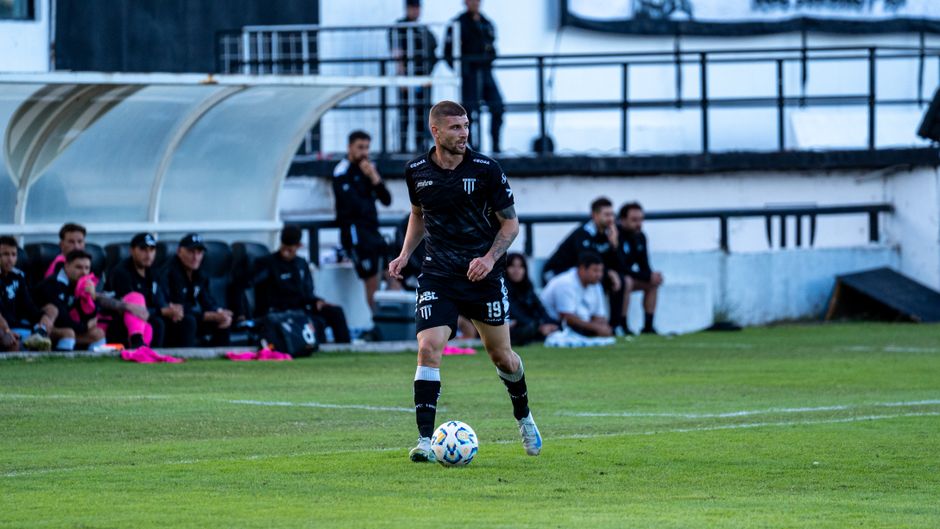
Soccer presents unique tracking challenges because of the size of the field and the importance of off-ball movement. A midfielder's best work often happens away from the ball — making a run that pulls a defender out of position, pressing high to force a turnover, finding space between the lines. Capturing this requires wide-angle footage that shows the full or near-full field, not a tight shot that follows the ball.
For soccer, camera placement matters enormously. A phone at midfield, elevated if possible, gives the AI the best chance of maintaining a consistent track. Footage shot from behind the goal or from a low angle near the sideline creates more occlusions and makes tracking harder. See our guide on auto-tracking players in soccer footage and tips on highlighting a player in soccer video for setup recommendations. For a detailed look at your options, read our comparison of AI soccer tracking platforms.
If your team uses Veo, you can also use PlayerTrac to process Veo recordings — see how to track a player in Veo video. And for putting together a polished final product, our soccer highlight reel guide covers structure, pacing, and what coaches want to see.
Basketball

Basketball is fast, dense, and full of occlusions. Ten players share a relatively small court, transitions happen in seconds, and bodies are constantly crossing paths. The AI needs to handle frequent player overlap, rapid direction changes, and the compressed space of a basketball court where your tracked player might be screened, boxed out, or buried in a rebounding scrum multiple times per possession.
The upside is that basketball footage is usually shot from a fixed, elevated position (press row, upper bleacher, or a wall-mounted camera), which gives the AI a clear top-down-ish perspective. This helps with tracking accuracy. The highlights themselves tend to be discrete and dramatic — a crossover, a block, a fast-break finish — which makes clip selection straightforward once the AI has delivered the raw tracking data.
For basketball-specific advice on building reels, see our basketball highlight reel guide.
Baseball
Baseball is structurally different from continuous-flow sports. The game is organized around discrete events — pitches, at-bats, fielding plays, baserunning — and there's natural downtime between them. This actually makes some aspects of tracking easier: the AI can segment the video by event rather than trying to maintain a continuous track through 90 minutes of unbroken action.
The challenge in baseball is camera angle. Most amateur baseball footage is shot from behind the backstop or from the bleachers along the first- or third-base line. These angles work well for at-bats but poorly for fielding plays in the outfield. A pitcher's reel requires footage that shows pitch movement and location; an outfielder's reel needs footage that captures their range and arm. Ideally, you'd have multiple camera angles, but that's a luxury most families don't have.

For baseball-specific guidance, see our baseball highlight reel guide.
Lacrosse

Lacrosse combines elements that make tracking both interesting and challenging. Like soccer, it's a continuous-flow sport played on a large field. Like basketball, it features rapid transitions, physical contact, and tight spaces around the goal. Add in stick skills, a small fast-moving ball, and rapid possession changes, and the AI has a lot to handle.
The small size of the lacrosse ball means the AI generally can't track the ball itself with the same reliability as a soccer ball or basketball. Tracking focuses on the player's body rather than the ball, which works well for showing an athlete's movement, positioning, and overall play but may miss some stick-skill details that happen too quickly or too small in the frame.
Lacrosse is also a sport where recruiting reels carry significant weight — the talent pool is concentrated, many programs are actively recruiting, and coaches rely heavily on video to evaluate prospects they can't see in person. For lacrosse-specific reel advice, see our lacrosse highlight reel guide.
How AI Tracking Changes Recruiting
The recruiting process has been shaped by access — access to exposure events, access to editing tools, access to coaching connections. AI player tracking changes one part of that equation: the cost and difficulty of producing a highlight reel. That's not everything, but it's not nothing either.
More Athletes Get Seen
When generating player-specific clips is fast and affordable, more athletes end up with reels. This is especially significant for athletes at small schools, in rural areas, or in programs without dedicated film operations. A talented player at a Division III high school in a farming community has the same potential as a player at a well-funded suburban program, but historically, the suburban player was far more likely to have a polished highlight reel ready to send to college coaches.
AI tracking lowers the production barrier to near zero. If someone at the game can film with a phone, the athlete can have a reel. That doesn't guarantee the athlete gets recruited — but it removes a meaningful obstacle that disproportionately affected under-resourced athletes and families.
Scouts Pre-Screen More Efficiently
College coaches are time-constrained. At most programs, a small recruiting staff is responsible for evaluating hundreds or thousands of prospects. They physically cannot attend every showcase, visit every high school, or watch every full game video that lands in their inbox. AI-generated clips give coaches a faster way to evaluate: instead of asking a prospect to send a full game film and hoping the coach has time to find the relevant plays, the athlete sends a focused reel that gets straight to the point.
This benefits both sides. The coach spends less time searching for the relevant moments. The athlete doesn't have to worry that their best play was buried at minute 47 of an 80-minute video. The result is a more efficient first-pass evaluation that lets coaches quickly identify who deserves a closer look — and then request full game film for those athletes they want to evaluate in depth.
For sport-specific recruiting reel advice, see our guide on college soccer recruiting videos.
The Equity Impact
The traditional recruiting path has favored families with resources. Attending showcase tournaments costs money. Hiring a video editor costs money. Private coaching and club fees cost money. Personal connections to college coaches — often built through expensive camps and recruiting services — advantage families who can afford them.
Affordable AI tracking tools change one piece of this equation. When a quality highlight reel can be produced from phone footage at a fraction of what a professional editor charges, the reel itself stops being a barrier. The athlete's talent becomes more visible regardless of their family's budget.
This doesn't eliminate all recruiting inequities — athlete development, coaching quality, and exposure opportunities still vary enormously. But the highlight reel, which was once a meaningful barrier, is becoming a solved problem.
It's important to be honest about the limits. AI tracking doesn't replace athlete development. It doesn't give an under-coached player better skills. It doesn't transport a rural athlete to a showcase in front of 50 college coaches. What it does is ensure that when an athlete has the talent, the inability to produce a highlight reel isn't the thing that keeps them invisible. That's a real and meaningful change, even if it's not a complete solution to the structural inequities in youth sports.
Choosing the Right Platform
There is no single "best" platform — there's the best platform for your specific situation. Here are the factors that should drive your decision.
Key Considerations
- Budget (total cost of ownership): Don't just compare subscription prices. Factor in hardware costs. A platform with a $15/month subscription but a $2,000 camera requirement has a very different total cost than a platform with a $25/month subscription that works with your phone.
- Sports played: Multi-sport families benefit from a single platform that handles all their footage. If your kids play soccer in fall, basketball in winter, and lacrosse in spring, you want one system, not three.
- Camera equipment you already have: If your team already uses Veo or Trace, those ecosystems deliver strong results. If you're starting from scratch with just a phone, a platform that accepts any footage source saves you an upfront hardware investment.
- Recruiting timeline: A freshman exploring options has different needs than a junior actively sending reels to coaches. Early on, you're building a library. Later, you need polished, ready-to-send recruiting reels quickly.
- Team vs. individual use: If you're a coach evaluating your whole roster, you need a team-oriented platform. If you're a parent focused on one athlete, an individual-focused tool is more efficient and usually more affordable.
Quick Decision Matrix
| Your Situation | Recommended Platform |
|---|---|
| Multi-sport family, filming with a phone | playertrac.ai |
| Soccer club with budget for dedicated cameras | Trace or Veo |
| High school coach needing film exchange | Hudl |
| Basketball player focused on skill development | HomeCourt for training; playertrac.ai or Hudl for game highlights |
| Athlete at small school with no film setup | playertrac.ai |
| Lacrosse player building recruiting reel | playertrac.ai |
Start Early, Build a Library
Regardless of which platform you choose, the single best piece of advice is to start filming and processing games now — even if you don't need a recruiting reel yet. Game footage from freshman and sophomore year becomes valuable context when you're building a junior-year reel that shows growth and development. Coaches want to see progression, not just a snapshot.
The cost of filming a game with a phone and running it through AI tracking is minimal. The cost of not having footage from a breakout performance you didn't capture is the opportunity you never get back. Start building your library early, and you'll have a rich archive to draw from when it matters most.
Ready to try it? Upload your first game video to PlayerTrac and see what AI player tracking looks like with your own footage.